
Last Updated on 4 jours ago by Jean-Luc Bruegger
What should you charge for an engraved keychain? For an acrylic door sign? Most makers look at what others charge on Etsy or at the local market, then round the number. The trouble is that a price set by feel almost always leaves something out: the time spent preparing the file, checking each piece, the material lost between cuts, or simply your own hour of work.
At our workshop in Switzerland, I ended up writing the method down, then turning it into a tool, the Price Calculator. This article explains how to price laser engraving from your real costs, one building block at a time, with a complete worked example. You can apply it with a plain spreadsheet. And you will see that in laser engraving, the machine is almost never what makes a piece expensive.
Why price laser engraving from your costs
Market prices are worth knowing, but they don’t tell you whether you are making money. Two shops selling the same item at the same price can have opposite margins: one engraves a full sheet in one run, the other makes each piece one at a time with ten minutes of setup every time.
Starting from your costs gives you a floor price, the price below which you work at a loss. Once you know that number, you can decide with your eyes open: match the market, move upmarket, or drop a product that earns nothing.
The five building blocks of a cost price
A laser engraving cost price is built from five blocks: machine cost, material, your labor, consumables, and margin. The first four tell you what a piece costs you. The fifth decides what it earns you.
1. Machine cost, per hour then per minute
A machine wears out and uses electricity. Its hourly cost has two parts.
Depreciation first: the purchase price divided by the working life you expect, in hours of operation. A 20 W diode laser bought for $900 that you expect to run for 2,000 hours costs $0.45 per hour of use.
Electricity next: the machine’s draw at the wall, in kilowatts, multiplied by your price per kilowatt-hour. Note that this is the electrical input power, not the optical power of the laser. Our 20 W diode draws about 120 W from the outlet. At 17 cents per kWh, that is 2 cents per hour.
Total: $0.47 per hour, less than one cent per minute. A 55 W CO2 laser bought for $3,500, expected to last 3,000 hours and drawing 600 W, comes to $1.27 per hour. More, but still very little.
2. Material, divided by what you get out of it
Material is bought by the sheet or by the piece. Its cost per item is the sheet price divided by the number of pieces you get from it for this particular product.
A 12 × 24 in sheet of 1/8″ basswood plywood at $4.50 yields 12 keychains: $0.38 per keychain. The same sheet would give you only a handful of larger signs. So the product decides, not the material. If you regularly lose one piece per sheet, count 11 pieces instead of 12: the calculation then includes the waste instead of ignoring it.
3. Labor, and only your labor
This is the block most often miscounted, in both directions.
While the machine engraves, you are not working on the piece. Billing all machine time as labor inflates the price. Billing none of it ignores the fact that you are watching the machine, you stay in the room, and a laser should never run unattended. The approach used in the calculator: only a share of machine time, supervision, counts as labor. In our examples that share is 20%.
Two other times are always full labor. Setup happens once per batch: opening the file, securing the sheet, focusing, running a test. It is therefore spread over the number of pieces. Finishing happens piece by piece: cleaning, removing residue, inspecting.
Time your real work rather than guessing. The job time estimated by your software before you start is a good basis for machine time. For setup, only a stopwatch tells the truth.
4. Consumables
Everything that is neither the main material nor the machine: a key ring, masking tape, a bag, a label. Each costs a few cents, but on a small item sold for four dollars, three forgotten consumables quickly add up to 10% of the price.
5. Margin and floor price
The total of the first four blocks is your cost price. Margin is applied on top: at 50%, a piece that costs you $10 sells for $15 before tax.
The floor price is there for small items. Below a certain amount, a sale no longer covers the time spent answering the customer, taking payment and packing. The calculator therefore keeps the higher of the two: cost plus margin, or the floor price.
Worked example: an engraved and cut keychain
Here is the full calculation for a basswood keychain, engraved then cut on a diode laser. These are the example values shipped with the free demo, so you can open it and find the same numbers.
| Input | Example value |
|---|---|
| Machine | 20 W diode laser, $900, 2,000 hours, 120 W at the wall |
| Electricity | 17 cents per kWh |
| Material | 1/8″ basswood plywood, $4.50 per 12 × 24 in sheet, 12 keychains per sheet |
| Machine time | 1.5 minutes engraving and 2 minutes cutting per piece |
| Batch setup | 10 minutes |
| Finishing | 30 seconds per piece |
| Hourly rate | $40 |
| Supervision | 20% of machine time |
| Margin | 50% |
| Floor price | $4 |
The same keychain, priced for a batch of 12 and for a single piece:
| Per piece, in $ | Batch of 12 | Single piece |
|---|---|---|
| Machine | 0.04 | 0.11 |
| Labor | 1.36 | 7.47 |
| Material | 0.38 | 0.38 |
| Cost price | 1.78 | 7.96 |
| Cost + 50% | 2.67 | 11.94 |
| Price before tax | 4.00 (floor) | 11.94 |
Labor counted per piece goes from 2 minutes in the batch to 11.2 minutes for the single piece. Three lessons stand out.
The machine accounts for 4 cents on a keychain. Even if it had cost twice as much, the selling price would barely move. What matters is your time.
Setup makes all the difference between a batch and a one-off. The 10 minutes of setup are shared by 12 pieces in the first case, and fall entirely on one piece in the second. That is why a one-off keychain with a name costs more than one from a batch, and rightly so.
The floor price protects small items. Without it, the batch keychain would sell for $2.67, which does not even pay for the time it takes to make the sale.
Diode, CO2 or fiber: what the machine changes
Take an acrylic door sign from the demo: 4 minutes of engraving, 3 minutes of cutting, two signs per $6 letter-size sheet of 1/8″ acrylic, 5 minutes of setup and 2 minutes of finishing.
On the CO2 laser, machine cost is $0.30. On the diode, $0.11. The final price goes from $13.35 to $13.07. A 28 cent difference: your choice of machine barely changes the price of a piece.
It does change what is possible. A diode laser cannot cut clear acrylic: the beam passes straight through. The calculator flags this: when a material needs a CO2 laser for a clean cut and the selected machine has none, the cutting time is still counted but marked « not guaranteed ». And a material that cannot be cut at all, like slate, glass or metal, cannot carry any cutting time: you never bill an impossible operation.
Dual-source machines, fiber plus diode for example, are handled as they are: the fiber marks bare metal, the diode engraves wood and leather, on the same machine.
Multi-step pieces
Some items involve several materials, or even several machines. A pocket knife engraved on its wooden handle and then on its steel blade, for example: one machine, two materials, two engraving times.
The method treats them as steps. Each step has its own machine, material and time. Setup and finishing, shared by the whole piece, are split between the steps in proportion to their machine time. With a single machine, the result is the same as entering everything in one block. With two machines, each carries its fair share.
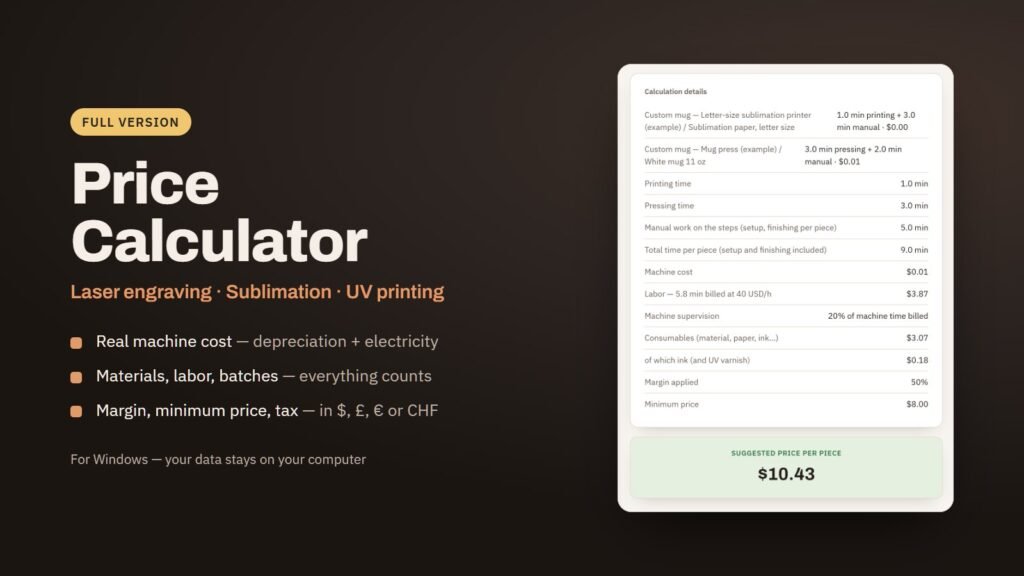
This is also what lets you combine engraving and printing in one product, since the calculator covers sublimation and UV printing as well. The demo includes a custom mug, a front-printed T-shirt and a UV-printed phone case to show how.
Tax and currencies
The whole calculation runs before tax, from machine cost to floor price. Tax is added at the very end, at the rate you choose. In the United States, sales tax is usually added at checkout, so a 0% rate fits. In the United Kingdom, the standard VAT rate is 20%. In Australia, GST is 10%. With a 0% rate, the price including tax equals the price before tax.
Amounts can be shown in US dollars, pounds sterling, euros or Swiss francs.
What the calculation won’t do for you
A cost price is not a selling price. The calculation tells you below which amount you lose money. It does not tell you what your customers are willing to pay. If the market pays well above your calculated price, nothing forces you to sell at the floor. If it pays well below, it is usually your setup time or your waste rate that needs work, not your margin.
The result also depends entirely on your numbers. An hourly rate set too low gives a low price, and that is the most common mistake among new makers: they forget to pay themselves. Finally, times are taken exactly as you enter them. Measure them on a real batch, not on your best piece of the day.
Try the method with your own numbers
The Price Calculator for laser engraving, sublimation and UV printing applies exactly this method. The demo is free: a file that opens in your browser, no installation, with example machines, materials and six products that you can change freely. Nothing is saved, and reloading starts over from the examples.
The full version costs €29. It saves your machines, materials and products, recalculates your whole catalog when a price changes, and lets you back up your data. It runs on Windows 10 or 11, 64-bit, not on Mac, with no account, no subscription and no Internet connection needed, and it comes with an English user guide.
If you are in Switzerland and still deciding on a machine, you can test your own material on xTool machines at our Demo Room in Boudevilliers, near Neuchâtel. The demonstration is free: book a slot or call +41 79 240 41 66, every day from 8 am to 7 pm.
Cet article en français : calculer le prix d’une gravure laser.